

Choosing a fleet dash camera system for commercial fleet use means balancing camera coverage, reliable evidence, night visibility, and installation needs—not just chasing the highest resolution. This roundup compares six options, from a truck-focused three-camera DVR to 360-degree multi-channel models and a basic ADAS road camera. The VSYSTO Upgrade 3CH is our top pick for mixed commercial vehicles because its front, side, and rear waterproof cameras are specifically described for trucks, trailers, vans, and RVs. For broader all-around recording, several multi-channel dash cams offer cabin and side views, while the REDTIGER emphasizes high-resolution front-and-rear capture. These products vary in design and may not provide cloud management or fleet telematics, so confirm vehicle compatibility, wiring, storage, and commercial requirements before buying. Use the comparison table to match a commercial vehicle camera system to your routes and budget.
Top Pick Our #1 Recommendation

Runners Up

WOINROAD 4K 360° Dash Cam, 4-Channel Front Rear Left Right, WiFi GPS 128GB
The WOINROAD D9plus combines four-channel recording, GPS, Wi-Fi, and an included 128GB card at a com…

LAMTTO 4 Channel Dash Cam 360 View Front and Rear Inside Left Right
The LAMTTO offers an unusually broad view for its $86.99 listed price, with a 128GB card, hardwire k…

REDTIGER VC70 4K+2.5K Dash Cam
The VC70 is a feature-rich dual-channel dash cam with strong headline resolution, GPS, and convenien…
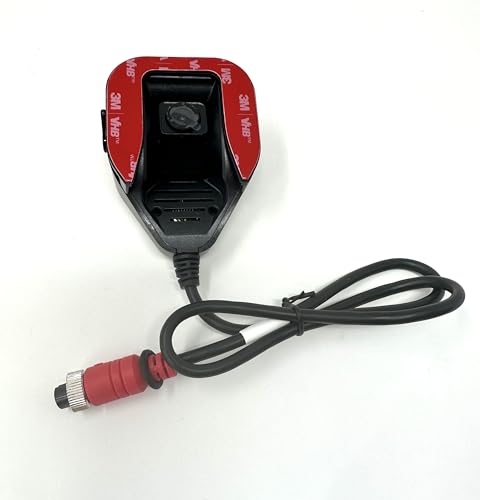
ADAS 720p Fleet Dash Cam – Advanced Driver Assistance System Camera with Lane Detection – HD Road-Facing Vehicle Camera for Fleet Safety & Compliance – Plug & Play DVR
This is a bare-bones, low-cost option for buyers who prioritize affordability and simple road-facing…

LOFOV 360° 4 Channel Dash Cam Front and Rear Inside
At $53.99, the LOFOV offers unusually broad camera coverage and a useful set of basics for drivers w…
How to Choose the Best Fleet Dash Camera System for Commercial Fleets
A fleet dash camera system for commercial fleet operations can help document collisions, coach drivers, and improve visibility into vehicle use. The right setup depends on fleet size, operating conditions, privacy needs, and whether you need live tracking or simply reliable video evidence. Compare total system costs—not just the camera price—and confirm that installation, connectivity, storage, and management tools fit your day-to-day operation.
Decide whether forward-facing footage is enough or whether you also need a driver-facing camera or a rear camera. Check performance in low light, glare handling, field of view, and whether footage remains readable when vehicles are moving. Consider driver privacy and communicate recording policies before deployment.
Check whether the system includes GPS vehicle tracking, event alerts, and a web or mobile dashboard. Some cameras require a separate data plan or subscription for cellular uploads and live viewing. Confirm coverage in your service areas, how alerts are sent, and whether the platform supports your number of vehicles.
Compare local memory card recording with cloud storage, including how long footage is retained and what happens when storage fills. Event-triggered recording can preserve collision clips, while cloud access can simplify remote retrieval. Check export options, overwrite controls, and whether footage can be downloaded without removing the camera.
Look for a secure mount, dependable power connection, and operating-temperature information suitable for your climate. Confirm whether installation is plug-in or hardwired and whether the camera supports parking-mode recording. For larger fleets, assess installation time, cable routing, and whether the setup can be standardized across vehicle types.
Review how drivers are notified, who can access video, and how footage is shared or deleted. Check dashboard usability, software updates, warranty coverage, and customer support availability. If using driver-facing video or audio, confirm local legal requirements and establish written rules for access, retention, and appropriate use.
Frequently Asked Questions
Final Verdict
For a fleet dash camera system for commercial fleet operations, the VSYSTO Upgrade 3CH is the strongest overall choice here for front, side, and rear views on trucks and trailers. The LAMTTO 4 Channel is a practical value candidate, with a hardwire kit and 128GB card listed, while the WOINROAD 4K 360° suits buyers prioritizing four-channel coverage, Wi-Fi, and GPS. These picks serve different needs rather than offering a universal winner. Confirm compatibility, installation demands, storage capacity, and the features included in the current listing before outfitting vehicles.
Tip: Before deployment, match camera coverage to vehicle type and route risks, then verify power, mounting, and storage requirements with the manufacturer’s instructions. Test every camera view and review recorded footage after installation; advertised resolution alone does not guarantee useful evidence in all conditions. Establish a consistent process for card checks, footage access, and retention, and make sure drivers understand the system. Check local rules on recording and privacy, particularly for in-cab cameras. A small pilot across representative vehicles can reveal fit or workflow issues before a full fleet rollout.
