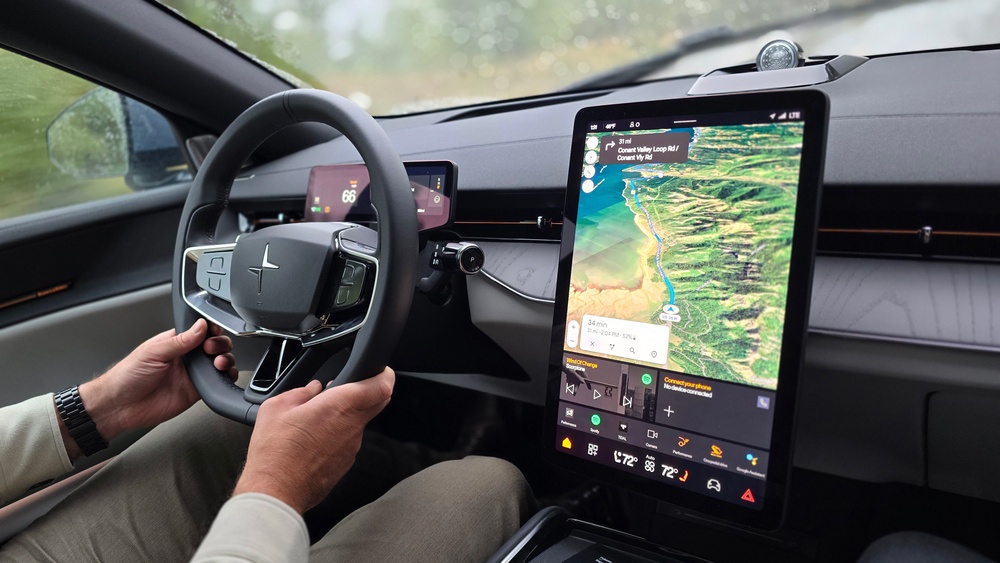
Have you ever heard the word infotainment and wondered what it means? It sounds like a mix of two words: information and entertainment. That is exactly what it is.
In a car, the infotainment system is the part that gives you information and fun things to do. It is usually a screen in the middle of the car’s dashboard. This screen helps you listen to music, find your way, talk on the phone, and even control the car’s temperature.
What Does a Car Infotainment System Do?
The car infotainment system is like your car’s smart helper. It has many jobs to make driving easier and more fun.
Here are the main things it does:
- Navigation: It helps you find your way using GPS. It shows maps and tells you when to turn.
- Communication: It lets you make phone calls without holding your phone. You can use Bluetooth or apps like Apple CarPlay and Android Auto.
- Vehicle Information: It shows important details about your car, like how much fuel you have or if the engine needs attention.
- Entertainment: You can listen to the radio, play music from your phone, or use streaming services.
- Comfort Control: You can change the temperature inside the car and make it more comfortable for everyone.
Why Do Cars Have Infotainment Systems?
Cars today are not just for driving. They are also places where people spend time and want to feel good.
The infotainment system helps drivers stay focused and safe. Instead of picking up your phone, you can use the car’s system to call or play music. This keeps your hands on the wheel and eyes on the road.
It also makes long drives more fun. You can listen to your favorite songs or podcasts. If you get lost, the system shows you the way.
How Does the Infotainment System Work?
The infotainment system works with many parts of the car and your devices. Usually, there is a big touchscreen in the middle of the dashboard.
You can touch the screen to choose music, maps, or calls. Some systems also use voice commands. You just say what you want.
The system connects to your phone using Bluetooth or a cable. This connection helps it play music from your phone or use apps like Apple CarPlay or Android Auto.
The car’s GPS system helps with navigation. It uses satellites to find your location. The screen then shows you the best route to your place.

Credit: www.motortrend.com
Common Features of Car Infotainment Systems
Here is a table of common features you can find in many car infotainment systems:
| Feature | What It Does |
|---|---|
| GPS Navigation | Shows maps and directions to your destination. |
| Bluetooth Connectivity | Connects your phone wirelessly for calls and music. |
| Touchscreen Control | Allows you to select options by touching the screen. |
| Voice Commands | Lets you control the system by speaking. |
| Music Streaming | Plays songs from apps like Spotify or Apple Music. |
| Climate Control | Adjusts the temperature inside the car. |
| Vehicle Info Display | Shows fuel level, engine status, and more. |
Where is the Infotainment System in Your Car?
You will usually find the infotainment system in the center of the car’s dashboard. It is often a big touchscreen.
Sometimes, there are buttons or knobs near the screen to help you control it. Newer cars also use voice control, so you don’t need to touch anything.
The system connects to speakers all around the car. This way, you can hear music or directions clearly.
Why Might My Car Infotainment System Not Work?
Sometimes, your car’s infotainment system might not work as expected. This can be frustrating.
Here are some common reasons why this happens:
- Software Glitches: Like any computer, the system can have bugs or errors.
- Connection Issues: Your phone might not connect properly with the system.
- Outdated Software: The system may need an update to work well.
- Hardware Problems: Sometimes the screen or buttons can break.
- Settings Error: The system settings might be wrong or changed by accident.
If your system stops working, try restarting the car or the system. Check your phone’s Bluetooth connection. If problems continue, visit a service center for help.
Credit: www.billbrownford.net
How to Use Your Car Infotainment System Safely
Using the infotainment system can be fun. But safety is very important.
Here are some tips to use it safely:
- Set up your music or navigation before you start driving.
- Use voice commands to keep your hands on the wheel.
- Don’t look at the screen for too long while driving.
- Ask a passenger to help if you need to change settings.
- Keep your system updated for the best performance.
Frequently Asked Questions
What Does Infotainment Mean In A Car?
Infotainment in a car combines information and entertainment through a touchscreen system. It controls audio, navigation, calls, and vehicle settings. This system connects smartphones, offers GPS directions, hands-free calling, music streaming, and climate control for a safer, enjoyable driving experience.
Where Is The Car’s Infotainment System?
The car’s infotainment system is located on the center console touchscreen. It controls audio, navigation, and communication features for easy access.
What Is An Example Of Infotainment?
An example of infotainment is Apple CarPlay, which integrates navigation, music, and hands-free communication in cars.
How Do I Restart My Car’s Infotainment System?
To restart your car’s infotainment system, press and hold the power button for 10 seconds. Alternatively, turn off the vehicle, open and close the driver’s door, then restart the car. Check your owner’s manual for model-specific reset instructions.
Conclusion
The car infotainment system is a smart tool that helps you drive better. It mixes information and entertainment in one place.
You can listen to music, make calls, find your way, and control car settings. It makes driving safer and more fun.
If your infotainment system stops working, don’t worry. Check connections or ask for help. Use the system wisely to enjoy your drive every time.