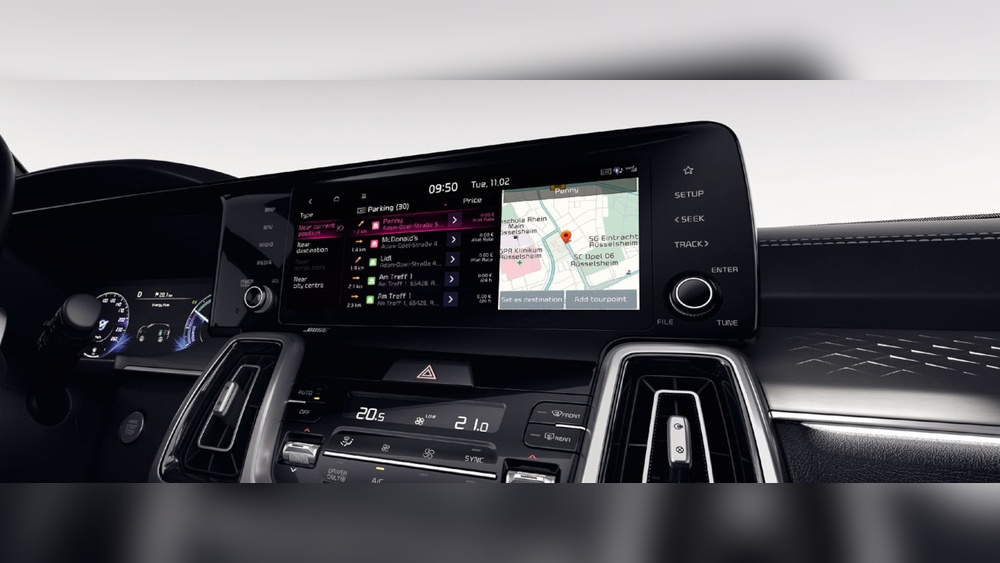
If you have ever been inside a modern car, you might have noticed a screen or a set of buttons in the middle of the dashboard. This is often part of the infotainment system. But what is it exactly? And how does it work? This guide will explain the infotainment system in easy words.
What Does the Word “Infotainment” Mean?
The word infotainment is a mix of two words: information and entertainment. It means a system that gives you useful information and also entertains you.
In cars, this system helps drivers and passengers with many things. It shows maps, plays music, and connects to phones. It makes the ride more fun and safer.
Where Can You Find the Infotainment System?
The infotainment system is usually in the center of the car’s dashboard. It can be a touchscreen or have buttons and knobs.
- In some cars, it looks like a small TV screen.
- Other cars use a mix of buttons and a smaller screen.
- New cars often have larger screens and better features.
What Are the Main Features of an Infotainment System?
The infotainment system has many useful features. Here are some of the main ones:
| Feature | Description |
|---|---|
| Navigation | Shows maps and helps you find routes. |
| Music and Radio | Plays songs from radio, phone, or USB. |
| Phone Connection | Connects your phone for calls and messages. |
| Vehicle Info | Shows car data like fuel level and speed. |
| Settings | Allows you to change how the system works. |
How to Use the Infotainment System?
Using the infotainment system is easy. Most systems have a menu you can open. The menu shows all the options.
- Look for a button or icon that says “Menu” or looks like a gear.
- Press it to open the main screen.
- Use the touchscreen or buttons to select what you want.
- Follow the instructions on the screen.
For example, if you want to listen to music:
- Press “Media” or “Music”.
- Choose radio, USB, or phone.
- Select the song or station.
How to Find Your Infotainment System’s Name and Version?
Sometimes you want to know the name or software version of your infotainment system. Here is how to find it:
- Go to the main menu of the system.
- Look for “Settings,” “Setup,” or a gear icon.
- Inside Settings, find “Info,” “About,” or “System Information”.
- Press it to see the system name and version.
In some cars, if you press and hold the “Menu” or “Setup” button for a few seconds, a hidden screen appears. This screen shows more details like part numbers or software version.
Why Does Knowing Your System Version Matter?
Knowing your system version helps when you want updates or need help. Car makers often release software updates. These updates fix bugs or add features.
If your system is old, it might not work well with new apps or phones. Checking the version helps you decide if an update is needed.

Credit: www.evanshalshaw.com
How to Turn Off the Infotainment System?
If you want to turn off the system or the screen, here are simple steps:
- Find the power button. It is often the volume knob.
- Press and hold it for a few seconds until the screen turns off.
- Or, go to Settings and find “Display” or “Screen Off”.
- Some cars have a special button to turn off the screen.
- The system may turn off automatically when the car is off.
How Does the Infotainment System Connect to Your Phone?
Most infotainment systems use Bluetooth or USB cable to connect phones.
Bluetooth is wireless. You can make calls or play music without cables. USB cable connection can charge your phone and transfer data.
Many cars support Apple CarPlay or Android Auto. These apps let you use your phone apps on the car screen safely.
Benefits of the Infotainment System
The infotainment system offers many benefits:
- Easy navigation: No need for paper maps.
- Entertainment: Listen to music or radio easily.
- Hands-free calls: Safer driving while talking.
- Car information: Know fuel, speed, and more.
- Customization: Change settings to your liking.
Are There Any Challenges With Infotainment Systems?
Like any technology, infotainment systems have some challenges:
- Sometimes the system can be slow or freeze.
- It can be hard to learn at first.
- Some systems need updates to work well.
- Touchscreens can distract drivers if used too much.
Always use the system safely. Focus on driving first.
Credit: ackodrive.com
Summary
The infotainment system is a part of modern cars. It gives information and entertainment. It shows maps, plays music, and connects to phones.
You can find it on the dashboard as a screen or buttons. Use the menu to explore its features. Check settings to find system info. Turn it off by pressing the power button.
This system helps make driving easier and more fun. But remember to use it safely.
Frequently Asked Questions
What Is My Infotainment System?
Your infotainment system is your vehicle’s central media and connectivity hub. Find its name and version in Settings > Info or System Information. Press and hold the Menu button to access detailed system info. Use the part number online to identify the exact model.
How Do I Turn Off The Infotainment System?
To turn off the infotainment system, press and hold the power button, usually integrated with the volume knob. Some vehicles have a “Display Off” option in settings or a dedicated button to turn off the screen. The system may also shut off automatically when the car turns off.
What Do You Mean By Infotainment System?
An infotainment system combines entertainment and information features in vehicles. It offers navigation, music, calls, and apps on a touchscreen interface.
Where Is My Car Infotainment System?
Your car infotainment system is located in the dashboard center console. Access its details via Settings > Info or System Information. Press and hold the Menu or Setup button for system version and model info.