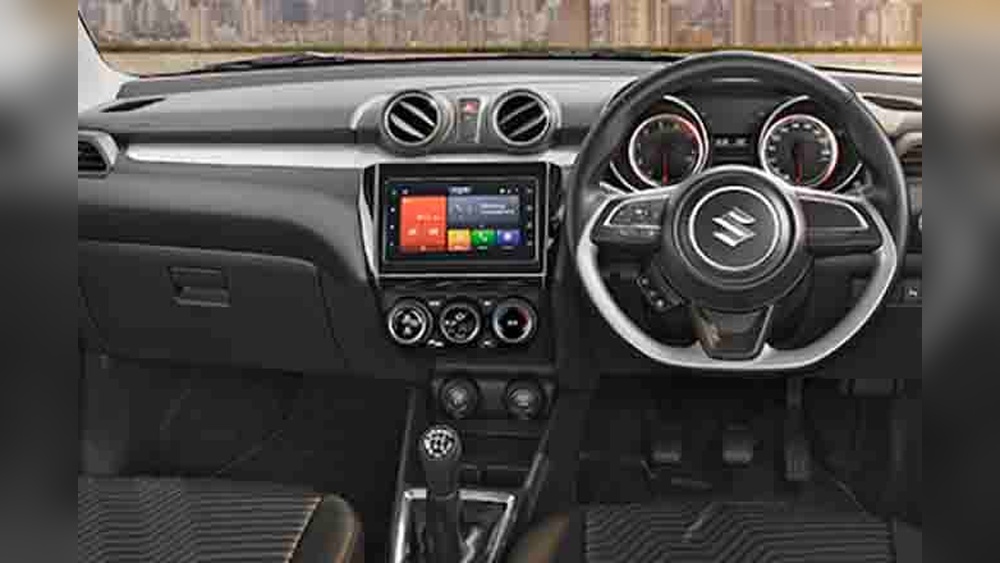
Have you ever wondered what makes your Swift’s driving experience more enjoyable and connected? The answer lies in the car infotainment system.
This smart setup isn’t just about playing music—it’s your personal assistant on the road, offering navigation, calls, and entertainment, all at your fingertips. If you want to fully understand how this system can transform your time behind the wheel, keep reading.
You’re about to discover how the Swift’s infotainment system puts control, convenience, and fun right where you need it—within easy reach.

Credit: brummstadt.com.au
Car Infotainment System Basics
The car infotainment system in Swift is a modern feature that combines entertainment and information. It helps drivers stay connected and enjoy their ride. This system is easy to use and improves the overall driving experience.
It offers various functions like music, navigation, and phone connectivity. The system is designed to keep drivers focused on the road while accessing important features quickly.
Key Features In Swift
The Swift infotainment system includes a touchscreen display for easy control. Bluetooth allows hands-free calls and music streaming. It supports smartphone integration like Apple CarPlay and Android Auto.
GPS navigation helps drivers find routes without distractions. Voice commands let drivers use features without touching the screen. USB and auxiliary ports allow connection of external devices.
How It Enhances Driving
This system makes driving safer by reducing distractions. Drivers can control music or calls without taking their eyes off the road. Real-time navigation helps avoid traffic and reach destinations faster.
It keeps drivers connected without needing to hold their phones. The clear display and simple controls make it easy to use. Overall, the infotainment system adds comfort and convenience to each trip.
Types Of Infotainment Systems
Car infotainment systems have become a vital part of modern vehicles. They offer convenience, entertainment, and connectivity while driving. There are different types of infotainment systems available for the Swift car. These systems vary in features and installation methods. Understanding these types helps you choose the best option for your needs.
Factory-installed Options
Factory-installed infotainment systems come pre-built in the Swift. They are designed to fit perfectly with the car’s dashboard and controls. These systems usually include a touchscreen display, Bluetooth, and voice commands. Some models offer navigation and smartphone integration. Factory options ensure better compatibility and reliability. They also come with the car’s warranty and support. The user interface is often simple and easy to use.
Aftermarket Choices
Aftermarket infotainment systems are added after buying the Swift. They offer more features and customization than factory systems. These systems can include larger screens, advanced navigation, and better sound quality. Many aftermarket options support Apple CarPlay and Android Auto. Installation may require professional help to fit the system properly. Aftermarket choices allow upgrades without changing your car. They provide flexibility for drivers who want more tech features.
Connectivity And Integration
The connectivity and integration features of the Swift car infotainment system make driving more enjoyable and safer. These features connect your devices smoothly with the car’s system. You can control music, calls, and navigation without distraction. This system keeps you connected while focusing on the road.
Smartphone Compatibility
The Swift infotainment system supports many smartphones. It works well with both Android and iPhone devices. You can connect your phone using Bluetooth or USB. This connection lets you access apps, music, and messages directly on the car screen. It also allows easy syncing of contacts and call history. The system updates automatically to stay compatible with new phones and apps.
Voice Control Features
Voice control helps you keep your hands on the wheel. You can make calls, send messages, or play music just by speaking. The system understands simple commands and responds quickly. This feature reduces distractions and improves safety. It works with many languages and accents. You feel more in control and connected without looking away from the road.
Entertainment Features
The entertainment features in the Swift car infotainment system bring joy to every drive. They help keep passengers happy and make trips feel shorter. The system offers clear sound and bright screens for a good experience.
It supports various media types so you can enjoy music and videos easily. The controls are simple and respond quickly. This makes the system easy to use while focusing on the road.
Audio And Video Options
The Swift infotainment system plays different audio formats. You can listen to radio, MP3 files, or podcasts. The speakers deliver clear and balanced sound for all passengers.
Video playback is also available on the screen. This lets passengers watch movies or clips during long trips. The screen is bright enough for good visibility in daylight.
Streaming And Apps
The system connects to the internet for streaming music and videos. Popular apps like Spotify and YouTube are easy to access. This means you have a wide choice of entertainment anywhere.
You can also use navigation apps and other useful tools. The system supports updates, so apps stay current and work well. It all adds up to a smart and fun driving experience.
Navigation And Safety
The car infotainment system in the Swift offers more than just music and calls. It plays a key role in navigation and safety. Drivers get clear directions and useful safety features. These help make every trip easier and safer.
Built-in Gps Benefits
The Swift’s built-in GPS guides drivers on the best routes. It shows real-time traffic updates to avoid delays. Drivers can find nearby fuel stations or restaurants easily. The GPS works without needing a phone connection. This ensures reliable navigation in all areas.
Driver Assistance Tools
The infotainment system includes helpful driver assistance tools. Alerts warn about lane departures or obstacles ahead. Some models offer speed limit notifications. These features help drivers stay alert and focused. They reduce the chance of accidents on the road.
Installation And Maintenance
Installing and maintaining a car infotainment system in your Swift keeps your drive enjoyable. Proper setup ensures all features work smoothly. Regular care extends the system’s life and performance. Simple steps help you avoid common problems and keep updates current.
Upgrading Your Swift
Upgrade your Swift’s infotainment system for better features. Choose compatible models made for your car. Professional installation is best to avoid errors. New software updates improve navigation and connectivity. Upgrades bring clearer sound and faster response times.
Troubleshooting Tips
Check connections if the system does not power on. Restart the system to fix minor glitches. Reset to factory settings if problems persist. Keep the software updated to prevent bugs. Clean the screen gently to avoid damage. Contact support if issues continue after basic fixes.
Benefits Of Infotainment In Swift
The infotainment system in the Swift offers many benefits that enhance your daily drive. It combines entertainment, navigation, and connectivity in one place. This system makes driving more enjoyable and comfortable. It also adds value to your vehicle in the long run.
Improved Driving Experience
The infotainment system provides clear navigation help. It reduces the need to check your phone while driving. This keeps your focus on the road. Music and calls can be controlled with simple voice commands. The system also supports smartphone integration. This means easy access to apps and contacts. Overall, it makes driving safer and more fun.
Increased Vehicle Value
A Swift with a good infotainment system holds its value better. Buyers prefer cars with modern tech features. This system shows that the car is up to date. It also improves the car’s appeal in the used car market. Maintaining the infotainment system can increase your resale price. It is a smart investment for car owners.
Credit: www.youtube.com
Credit: sinfoniagulfcoast.org
Frequently Asked Questions
What Features Does Swift’s Car Infotainment System Offer?
Swift’s infotainment system includes touchscreen controls, Bluetooth connectivity, smartphone integration, navigation, and voice commands. It enhances driving with music, calls, and real-time navigation, providing convenience and safety.
How Does The Swift Infotainment System Improve Driving Experience?
The system offers easy access to media, calls, and maps without distractions. Voice commands and touchscreen controls ensure safer, more convenient driving, keeping focus on the road.
Is The Swift Infotainment System Compatible With Smartphones?
Yes, Swift’s infotainment system supports Apple CarPlay and Android Auto. This allows seamless smartphone integration for calls, messages, music, and navigation through the car’s display.
Can I Update The Swift Infotainment System Software?
Yes, Swift’s infotainment system supports software updates. Updates improve performance, add new features, and fix bugs, ensuring your system stays current and efficient.
Conclusion
The car infotainment system in Swift adds comfort and fun to every drive. It helps you stay connected and find your way easily. With simple controls, it keeps you focused on the road. This system suits both daily trips and long journeys well.
Understanding its features makes driving more enjoyable and safe. A good infotainment system is a smart choice for any Swift owner.