Have you ever found yourself standing outside your Mazda 3, pressing the key fob only to get no response? The culprit might be something simple yet crucial: your car key battery.
Understanding what a Mazda 3 car key battery is and how it works can save you from unexpected frustrations. You’ll discover why this tiny battery matters, how to know when it’s time to replace it, and easy steps to keep your key fob working perfectly.
Keep reading to make sure you’re never caught off guard again.
Mazda 3 Key Battery Basics
The Mazda 3 key battery powers the remote functions of your car key. It allows you to lock and unlock doors without using the physical key. The battery also helps start the engine with push-button ignition. Understanding the key battery helps you keep your car working smoothly.
Replacing the battery at the right time saves you from inconvenience. Knowing the basics about the battery type, lifespan, and warning signs is important. This information helps you act before the battery dies completely.
Types Of Key Batteries
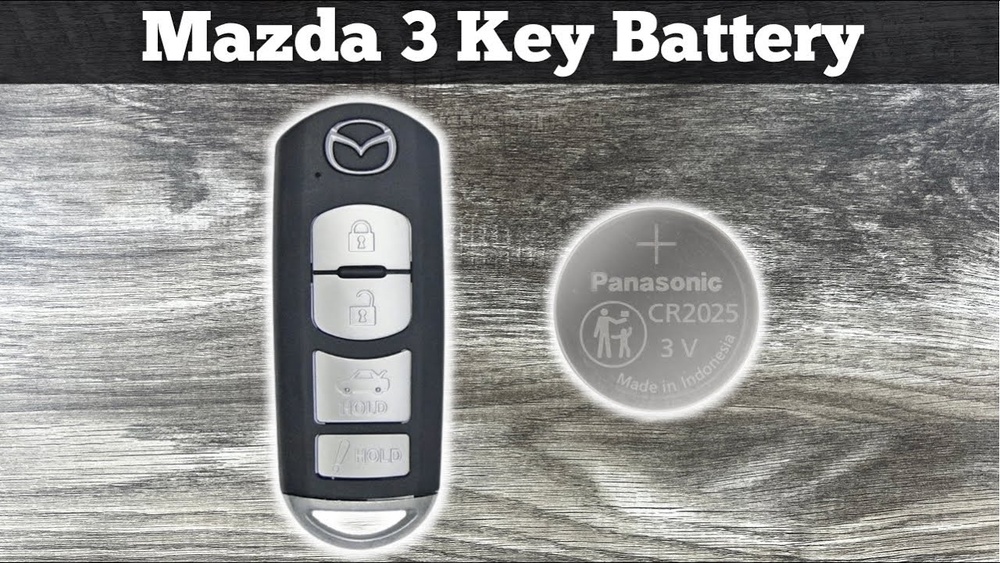
The Mazda 3 key usually uses a small coin cell battery. The most common type is CR2025 or CR2032. These batteries are easy to find in stores or online. They are lightweight and provide enough power for key functions.
Battery Lifespan
Key batteries last about two to three years on average. Usage frequency affects how fast the battery drains. Cold weather can also reduce battery life. Checking the battery every year keeps you prepared for replacement.
Signs Of A Weak Battery
Your key may stop locking or unlocking the car remotely. The engine push-button might not respond immediately. The key’s LED light may dim or stop working. These signs mean the battery needs replacement soon.

Credit: www.youtube.com
Replacing The Mazda 3 Key Battery
Replacing the Mazda 3 key battery is a simple task anyone can do at home. Over time, the battery inside the key fob loses power. This makes the remote stop working properly. Changing the battery restores the key’s full function. The process requires only a few tools and takes just a few minutes.
Follow the right steps to avoid damaging the key. Use the correct battery type for the Mazda 3 key. This ensures the key works well after replacement.
Tools Needed
- Small flathead screwdriver
- New CR2025 or CR2032 battery (check your key type)
- Clean cloth
Step-by-step Replacement
- Hold the key fob firmly in one hand.
- Use the flathead screwdriver to gently pry open the key case.
- Remove the old battery carefully using the screwdriver or your finger.
- Place the new battery in the same position with the positive side up.
- Snap the key case back together until it clicks.
- Test the key to make sure it works properly.
Precautions During Replacement
- Do not use sharp tools that can damage the key.
- Avoid touching the new battery with wet or dirty hands.
- Make sure the battery is inserted the right way.
- Keep old batteries away from children and pets.
- Dispose of the old battery properly at a recycling center.
Choosing The Right Battery
Choosing the right battery for your Mazda 3 car key is important. It ensures your key works well and lasts long. A wrong battery can cause problems like poor signal or quick drain. Knowing which battery fits and where to buy helps you avoid these issues.
Compatible Battery Models
The Mazda 3 key commonly uses CR2025 or CR2032 batteries. These small coin batteries fit inside the key fob. Check your car key manual or the battery itself for the correct model. Using the exact battery type keeps your key working smoothly.
Where To Buy
You can buy car key batteries at local stores or online shops. Electronics stores, supermarkets, and car accessory shops often stock these batteries. Online retailers offer a wide range and can deliver to your home. Always choose a reliable seller for genuine batteries.
Battery Quality Tips
Pick batteries from well-known brands. High-quality batteries last longer and perform better. Avoid very cheap or unknown brands. Check the expiry date on the package. Store batteries in a cool, dry place before use. Proper care helps your key stay powered longer.

Credit: www.amazon.com
Maintaining Your Key Battery
Maintaining your Mazda 3 car key battery helps keep your key fob working well. A healthy battery ensures the key fob sends signals to your car without delay. Taking simple steps can extend the battery life and save you from trouble.
Regular care avoids sudden battery failure. It keeps your daily routine smooth and stress-free. Here are some tips to maintain your key battery effectively.
Storage Tips
Store your key fob in a cool, dry place. Avoid leaving it in direct sunlight or near heat. Keep it away from water and moisture. Use a protective case to prevent damage. Proper storage helps preserve battery power longer.
Avoiding Battery Drain
Do not press buttons repeatedly without need. Avoid holding the key fob near strong electronic devices. Remove the key fob from your pocket if you carry a mobile phone. Turn off any unnecessary functions on the key fob. These steps reduce unnecessary battery use.
Regular Battery Checks
Check the battery level every few months. Replace the battery when you notice weak signals or delays. Use the battery type recommended by Mazda. Test the key fob functions after battery replacement. Regular checks prevent sudden key fob failures.
Troubleshooting Key Battery Issues
Troubleshooting key battery issues in your Mazda 3 car key is important. A weak or dead battery can stop the key fob from working properly. This can cause frustration, especially when you need to unlock or start your car quickly. Understanding the common problems and how to fix them can save time and effort.
Common Problems
One common problem is the key fob not responding. This may happen when the battery is low or dead. Another issue is the reduced range of the key fob. You might need to be very close to the car for it to work. Sometimes the buttons on the key fob stop working properly. Dirt or wear can cause this problem.
When To Seek Professional Help
If replacing the battery does not fix the issue, seek professional help. A car locksmith or dealership can check for deeper problems. The key fob might need reprogramming or repair. Avoid trying to fix complex issues yourself to prevent damage.
Resetting The Key Fob
Resetting the key fob can solve some battery problems. Start by removing the old battery carefully. Wait a few minutes before inserting a new one. Press and hold the lock and unlock buttons together for a few seconds. This can reset the key fob and restore its function. Try this step if the key fob still does not work after battery replacement.
Credit: www.mazda3revolution.com
Frequently Asked Questions
What Type Of Battery Does Mazda 3 Car Key Use?
Mazda 3 car keys typically use a CR2025 or CR2032 lithium coin battery. These batteries provide long-lasting power for remote key functions. Always check your key fob or owner’s manual for the exact battery type before replacement.
How Often Should I Replace Mazda 3 Key Battery?
You should replace the Mazda 3 key battery every 2 to 3 years. Signs like weak remote signal or difficulty unlocking indicate a low battery. Timely replacement ensures smooth key fob operation and prevents lockout issues.
How To Replace The Mazda 3 Car Key Battery?
To replace the Mazda 3 key battery, open the key fob carefully with a small flat tool. Remove the old battery and insert a new one with correct polarity. Reassemble the fob and test remote functions to confirm successful replacement.
Can I Use Any Battery For Mazda 3 Car Key?
No, use only the specified battery type like CR2025 or CR2032 for Mazda 3 keys. Using incorrect batteries can damage the key fob or cause malfunction. Always buy high-quality, compatible batteries for best performance.
Conclusion
The Mazda 3 car key battery is small but important. It helps your key work properly every day. Changing the battery is easy and saves time. Knowing the right type avoids problems later. Keep a spare battery handy for peace of mind.
This simple step keeps your Mazda 3 ready to go. Don’t wait for the key to stop working. Stay prepared and enjoy smooth driving always.